

Get a FREE Vape
Sign up to get a FREE welcome vape on your first order when you buy 4 or more products.


Geek Bar is a well-known vaping industry brand that specializes in innovative, user-friendly disposable vape devices. It is committed to providing vapers with high-quality products with exceptional flavor and satisfaction. Geek Bar devices are designed to be accessible, making them suitable for both beginners and experienced vapers alike.
Geek Bar Pulse features and specifications
|
The Geek Bar Pulse doesn't compromise on flavor, either. With its dual mesh coil and advanced dual-core technology, every puff is filled with rich, satisfying flavor and dense vapor clouds that rival even the most complex vaping setups.
And let's talk about convenience—the full-screen display looks sleek and gives you real-time insights into your vaping metrics. It's like having a high-tech vaping companion right at your fingertips.
If you're looking for a disposable vape that delivers exceptional performance, versatility, and style, the Geek Bar Pulse is the device you've been waiting for. Elevate your vaping experience to the next level with the Geek Bar Pulse—your perfect companion for all-day enjoyment.
Geek Bar Pulse design
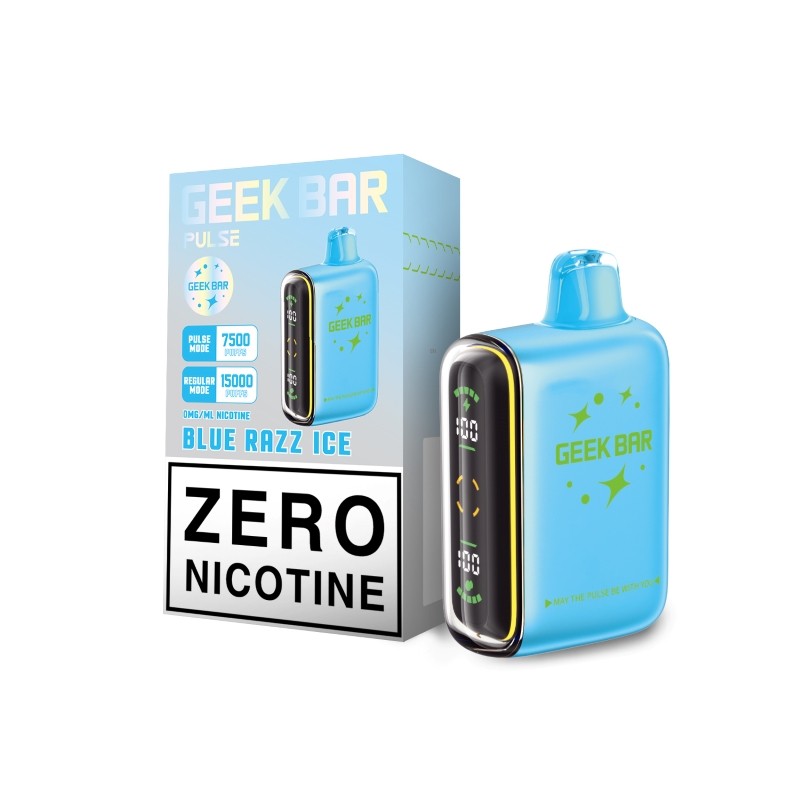
The Geek Bar Pulse boasts a sleek and modern design that sets it apart from other long lasting disposable vapes. One standout feature is the full-screen display, which adds a touch of sophistication and functionality to the device. The screen is intuitive and easy to use, providing clear visibility of essential vaping metrics.
To use the screen on the Geek Bar Pulse, simply inhale from the mouthpiece to activate the device. The screen will light up, showing needed information such as battery level, puff count, and mode settings. The display is bright and easy to read, making it convenient to monitor your vaping session at a glance.
As you gaze at the night sky or indulge in your favorite flavor, allow the astrology-inspired design of the Geek Bar Pulse to whisk you away to a realm where the endless possibilities mirror the boundless cosmos.
===ARTICLE_CTA===
How do you use the Geek Bar Pulse?
-
Unpack with care: Begin by tearing away the strip around the top of the box. Take out and open the inner pouch. Remove the silicone plug from the mouthpiece.
-
Power up: Turn on the Geek Bar Pulse by flipping the switch on the bottom of the device to the middle or upper position. Unlike many disposable vapes, the Geek Bar Pulse has a rechargeable battery and can be turned on and off. The device is off when the switch is in the lowest position. You should see the screen light up when you move the switch.
-
Taking a puff: To vape, simply inhale on the device. If you're new to vaping, use a gentler puff than you would when smoking a cigarette. Using too much force might cause the Geek Bar Pulse to gurgle or spit e-liquid into your mouth.
-
Adjusting settings: You can change the Geek Bar Pulse's settings by flipping the switch on the bottom of the device. There are three options: off (lowest position), normal (up to 15,000 puffs), and Pulse (up to 7,500 puffs with double the vapor production).
-
Recharging: When the battery indicator shows it's empty, replenish the Geek Bar Pulse by connecting it to your computer with a USB-C cable.
-
Replacing the device: When the e-liquid indicator is nearly empty, it's time to start thinking about replacing the device. If the Geek Bar Pulse starts producing a very burnt flavor, it means it's out of e-liquid.
Geek Bar Pulse modes
Despite housing two integrated mesh coils, the Geek Bar Pulse is compact and ergonomic. Its transparent shell is durable yet comfortable, ensuring a pleasant vaping experience without excessive rigidity. The device's size is comparable to other disposable vapes on the market, making it portable and easy to carry.
Pulse regular mode
This mode indicated by a green light, provides a consistent and steady vaping experience. It's perfect for users who prefer a smooth draw with continuous vapor production. When in Regular Mode, the screen on the Geek Bar Pulse will illuminate in green, providing a clear visual indication of the mode selected.
Pulse mode
This mode generates more vapor production and intense flavor, resulting in higher wattage. Also, in Pulse Mode, indicated by a rocket ship icon, the Geek Bar Pulse delivers a dynamic vaping experience with intermittent bursts of vapor. This mode is ideal for those who enjoy a more intense flavor sensation. In Pulse Mode, you will see a rocket ship icon displayed on the screen, signaling that the device is in this dynamic vaping mode.
Activation and Deactivation:
- To Activate Modes: Simply inhale from the mouthpiece to activate the Geek Bar Pulse. The device will light up in either green (Regular Mode) or display a rocket ship icon (Pulse Mode) on the screen, indicating the selected mode.
- To Deactivate Modes: The Geek Bar Pulse does not require manual deactivation. After inhaling, the device will automatically stop firing once you release the airflow, conserving battery life and e-liquid for the next use.
-
===PRODUCT_7457914650666===
-
===PRODUCT_7457915371562===
-
===PRODUCT_7457914978346===
-
===PRODUCT_7457910849578===
Geek Bar Pulse performance
The Geek Bar Pulse is an innovative disposable vape device that stands out for its exceptional performance. Unlike typical disposable vapes with single-coil designs, it integrates two coils, each with distinct characteristics, to significantly boost vapor production and flavor intensity.
The Geek Bar Pulse is a significant technological advancement that combines the unique features of dual coils and higher power settings into a single disposable vape. It offers vapers the performance and satisfaction typically associated with advanced refillable setups. The 5% nicotine strength further amplifies the effect, delivering a strong throat hit akin to higher-powered devices, this can lead you to a very satisfying experience along with the following tips:
- Optimize wattage/power settings: If your device allows you to adjust wattage or power settings, find the optimal setting for the coil you're using. This can vary based on the e-liquid and coil resistance.
- Keep your device clean: Regularly clean your device to prevent residue buildup and ensure optimal performance. Pay attention to the tank or pod, airflow vents, and connections.
- Avoid chain vaping: Allow short breaks between puffs to prevent the coil from overheating and extend your device's longevity.
Geek Bar flavors
The Geek Bar disposable vape device offers a wide range of flavors, boasting over 26 different options to suit various preferences from our Geek bar collection. Some popular flavors typically available for Geek Bar include:
Sour Apple Ice
A tart and crisp green apple flavor that is both sweet and sour, offering a refreshing vape hit for when you´re by the pool having a good time with your friends!
Pink Lemonade.
Zesty lemonade with a touch of sweetness is ideal for a cooling sensation during hot summer days at the beach.
Mango Ice.
Sweet and juicy mango flavor infused with a cool menthol finish, providing a tropical and refreshing vape. It's perfect to take on a hot summer road trip.
Watermelon Ice.
Crisp watermelon flavor combined with a menthol chill, delivering a refreshing and fruity vape for those vacation nights out!
Blueberry Sour Raspberry. A blend of ripe blueberries and tangy raspberries, offering a delightful combination of sweet and sour notes perfect for summer afternoons.
How do you know when a Geek Bar is empty?
Determining when a Geek Bar is empty can be straightforward. The Geek Bar is a disposable vape device, and you'll know it's empty when:
- No vapor production: When you take a puff and no vapor is produced or the vapor production is significantly reduced, it's a sign that the Geek Bar is likely empty or very low on e-liquid.
- Burnt or dry taste: If you start experiencing a burnt or dry taste when puffing on the Geek Bar, it could indicate that the e-liquid has run out, and you're now inhaling the wick without any liquid.
- Visual inspection: Sometimes, you can visually inspect the Geek Bar to see if the e-liquid reservoir is empty. Some devices have a small window or indicator that allows you to check the e-liquid level.
===KLA===
Geek Bar Pulse Review FAQs
How long does a Geek Bar Pulse flavor last?
You can use approximately 20% of the juice in a couple of hours before the battery is drained. All that flavor comes with a tradeoff. In regular mode, moderate vaping can last a good half a day, plus you can pick out from our list of our healthiest vapes for summer.
Are Geek Bar Pulse flavors suitable for beginners?
Flavorful vapor is readily available with no finicky controls or menus to navigate. Because of how simple it is, newcomers and seasoned pros will love it. With every puff, you're sure to get a satisfying vape.
You won't need to push any buttons to vape thanks to the draw-activated firing mechanism. Neither the menus nor the settings are very complex. The battery is activated, and vaping begins as soon as the user inhales through the mouthpiece.
Check our disposable vape blogs for more information!
Other vapes recommendations:
Check our Juicy Bar Vape collection