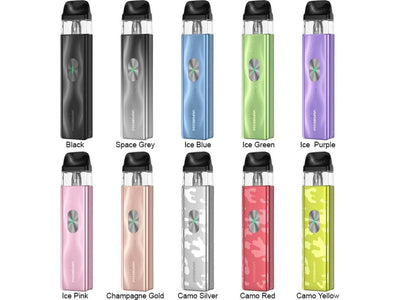
Shop the Vaporesso XROS 4 Mini Pod Kit, featuring a... Read More
Shop the Vaporesso XROS 4 Mini Pod Kit, featuring a 1000mAh integrated battery, an aluminum unibody design, and supported by the XROS Mesh Pods. Constructed with portability in mind, the XROS 4 Mini is hewn from aluminum, offering a lightweight chassis without sacrificing durability. Compatible with the XROS integrated coil pods, the XROS 4 Mini possesses an intelligent wattage detection suite that automatically selects and identifies the ideal wattage for the installed pod, making this perfect for novice or advanced vapers alike.
Vaporesso XROS 4 Mini Features
-
Battery Capacity: Integrated 1000mAh battery for extended use.
-
Construction: Lightweight and durable aluminum unibody design.
-
Pod Compatibility: Compatible with XROS Mesh Pods for versatile vaping.
-
Wattage Detection: Intelligent wattage detection suite for optimal performance.
-
Portability: Compact and lightweight, perfect for on-the-go vaping.
How to Fill Vaporesso XROS 4 Mini?
-
Remove the Pod: Detach the pod from the XROS 4 Mini device.
-
Open the Fill Port: Locate and open the fill port on the side of the pod.
-
Fill the Pod: Insert the eJuice bottle nozzle into the fill port and fill the pod with your preferred eJuice or nicotine salt.
-
Close the Fill Port: Securely close the fill port to prevent leaks.
-
Reattach the Pod: Place the filled pod back into the XROS 4 Mini device.
Why is My Vaporesso XROS Mini Blinking Red 5 Times?
The Vaporesso XROS Mini blinking red 5 times typically indicates a low battery level. Charge your device using the included USB cable to resolve this issue.
How to Turn On Vaporesso XROS Mini?
-
Power On: Press the fire button 5 times rapidly to turn on the device.
-
Power Off: Press the fire button 5 times rapidly to turn off the device.
How to Clean Vaporesso XROS Mini?
-
Turn Off: Ensure the device is turned off before cleaning.
-
Remove the Pod: Detach the pod from the device.
-
Clean the Pod: Rinse the pod with warm water and let it dry completely.
-
Clean the Device: Wipe the exterior of the device with a damp cloth. Avoid getting water into the device.
-
Reassemble: Once everything is dry, reattach the pod to the device.